Sky Planner
A to do planner browser extension created for personal use.
Project Overview
This project was made as a tool for personal use. Before creating this tool, my methods of task management were quite chaotic, as it was distributed over three different platforms: my general daily to do list, on paper, my notion to do list for more long term tasks, and my school calendar. Because it was strictly intended for personal use, I had full creative control over it and could fully cater it to my specific needs. This also meant that I did not add an account or authorisation requirement for access.
The technologies I used for this To Do Tool were HTML, CSS and JavaScript, with a Node.js backend and MongoDB database to store the tasks. I kept the frontend practical and minimal, focussing on function above style.
The Assignment
While it wasn't an assignment in the traditional sense, I still had a list of features and functionality that I intended to implement in this tool.
First off, I wanted it to fully replace at least two of the three tasks lists I used before. I didn't feel like implementing my school tasks into the project would be beneficial, since that platform also handles the submission of the assignments as well as any explanations and changes made to the tasks.
Secondly, it was important to me that I could classify and filter tasks by type. This way, I could easily see what I had planned for the future and pick additional tasks for the day based on what I feel like doing.
Thirdly, deadlines were also an important implementation to make. All tasks are ordered by deadline first and foremost, and then all those without an end date come past that. This way I could be sure I wouldn't look over something urgent. Additionally, I also implemented daily recurring tasks that automatically reinstated themselves upon the day reset.
Lastly, I wanted to be able to access this tool from both my laptop and my phone. On my laptop, I created it to be a browser extension, while in my phone it is a mock-application through a downloaded webpage.
The Process
While I've reached a point that I'm quite satisfied with so far, I will continue to iterate on my application as any other ideas for features come to mind. At the moment, this is what I have implemented.
Step 1: The API
The API is for the most part the standard setup for a Node.js and Express backend. I added the standard GET, POST and DELETE requests to manage the tasks, but I also made a few custom endpoints to handle daily task resetting, task activation and completion.
Step 2: The Task Overview
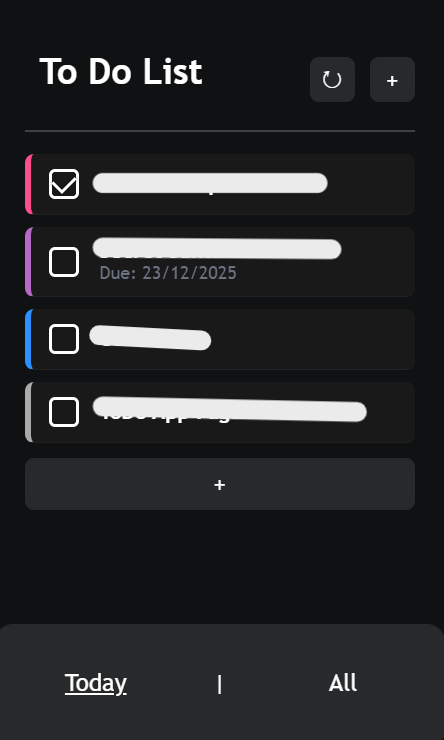
The task overview consists of two tabs, one being the active tasks and the other being inactive tasks. The active tasks tab serves as an overview of what I intend to get done today, while the inactive tab keeps track of things scheduled for in the future. That tab also allows for mass task management, letting me delete or activate tasks at my discretion.
The tasks are colour coded based on their category, which I'll elaborate on further in the Filtering section.
Step 3: The Filtering System
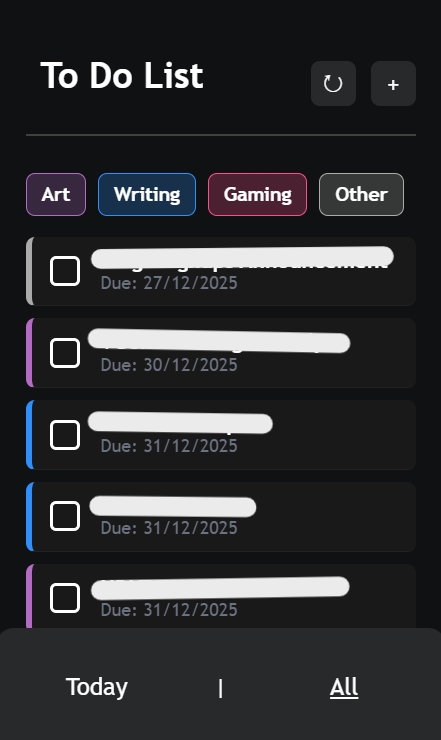
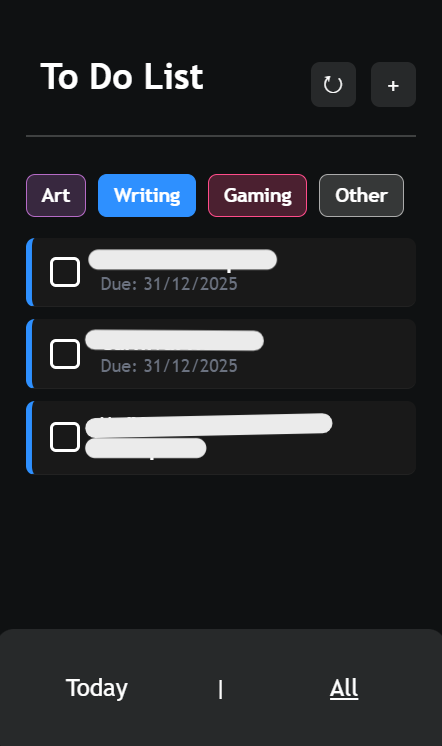
As mentioned before, I wanted to be able to classify and filter tasks by type. To achieve this, I created a filtering system based on categories that I could assign to each task. Each category has its own colour, which is then reflected in the task overview.
My choice of categories was a rather simple pick, as I used the same categories and colours on my Notion page to do list. Since this to do tool is entirely for personal use and primarily intended to keep track of leisure projects, the chosen categories reflect that.
Step 4: Adding Tasks
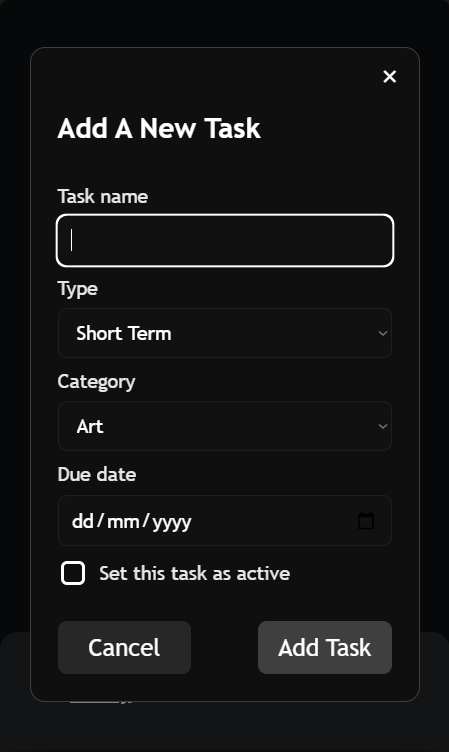
Another feature that was integral to the functionality of the tool was the ability to add new tasks from within the application. To achieve this, I implemented a simple form with fields for all the relevant information, as well as the option to immediately activate the task once it's created.
Step 5: Daily Tasks
Certain tasks are recurring on a daily basis, such as medications or even something as silly as drinking water. To accommodate for this, I implemented a daily task feature that automatically reinstates these tasks every day. I initially intended for this to be a timed event, but since I use the free version of my hosting service, the app experiences downtime and would not be active to register the passing of midnight, thus not causing the daily reset. Instead, I added a reset button at the top of the page to click each morning.
Step 6: Task Collections
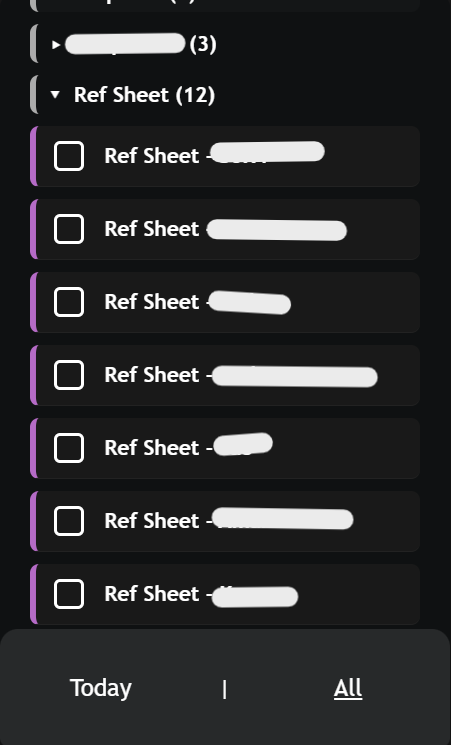
After a few weeks of usage, I noticed that the All Tasks tab had gotten quite cluttered with similar tasks. This made scrolling through to find tasks of a different nature quite inconvenient. In order to resolve this, I implemented Task Collections, which are essentially groups of tasks that can be expanded or collapsed at will. This way, I can keep similar tasks together and reduce the amount of scrolling needed to find what I'm looking for. Tasks get grouped together based on the first half of their name. If there is any title before a "-" mark, it will be considered the collection name and all tasks beginning with that same title will be grouped together. I opted for this instead of a manual map system because I intuitively noted my tasks down in a very similar way, and it reminded me of indented lists in my old program.
My Future Intentions
While I'm quite satisfied with the current state of my Sky Planner tool and have used it for several months at the time of writing this, there are still a few features and improvements I intend to implement in the future.
First off, the option to edit existing tasks is something I would like to add. Currently, if I make a mistake or need to change something about a task, I have to delete it and create a new one. This is not ideal and I would like to implement an edit function to make this process smoother, given I did already add a PUT request route to the API.
Additionally, I'd like to look into tasks that repeat on a time scale that is not daily, but instead a set number of days. This way I can implement tasks that happen every Tuesday, for example. I would have to make some adjustments to the daily reset code and the task model, but I imagine this would not be too complicated.
In conclusion, it's still a work in progress that will keep evolving along with my needs for it, but it is quite functional and more than satisfactory for the purpose it serves.